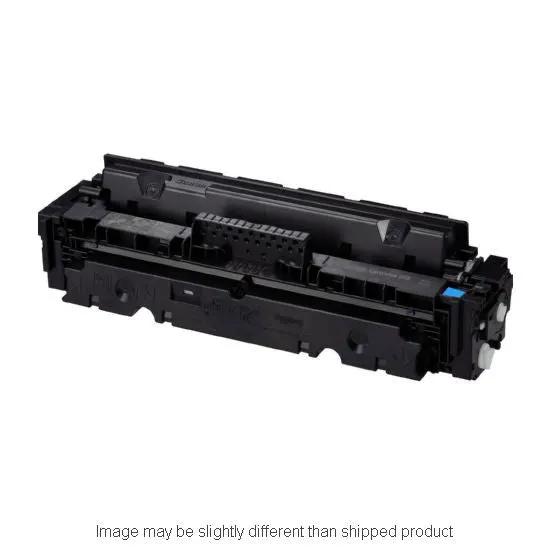
Introducing the COMPRP Canon 3015C001 CRG055 SD Cyan with Chip—a premium replacement toner crafted to deliver sharp text and vivid graphics right from the first print. Engineered to align with Canon’s color output, this cyan cartridge maintains dependable performance in busy home offices and small-to-mid size workspaces.
Chip-enabled reliability
The CN3015C001WC chip communicates with your Canon printer to deliver accurate page counts and reliable status updates, reducing cartridge errors and downtime for a smoother printing workflow.
Exceptional yield and color
Rated at 2,100 pages, this cyan cartridge helps you print more between replacements while keeping costs predictable for color-heavy projects. Vibrant cyan brings skies, graphics, and text to life, ensuring professional-looking documents that stand out.
OEM-grade performance
Manufactured with high-quality components to closely mirror Canon’s color output and durability, delivering consistent results batch after batch.
Effortless installation
Designed for straightforward replacement in printers that use CRG055 cyan cartridges, enabling a clean, user-friendly swap with minimal downtime.
Ideal use cases
Perfect for marketing materials, business reports, color flyers, price sheets, and any multi-page color print job where color fidelity matters. Use cases range from bold product catalogs to bright, compelling presentations—anytime you need consistent cyan that complements your magenta and yellow for a true four-color print.
Why choose this replacement?
It delivers reliable page yields, chip-level monitoring, and Canary-quality cyan output at a practical price point—an intelligent alternative for teams aiming to maintain color accuracy and workflow efficiency without paying premium OEM prices.
Practical tips for best results
- Store cartridges upright in a cool, dry place away from direct sunlight.
- Install promptly after opening to minimize exposure to air.
- Run a calibration or color alignment after installing a new cyan cartridge to ensure color balance with the remaining inks.
- If color appears off, perform a printer cleaning cycle and print a test page to verify consistency.